WX-Plus
Hindi
-
Layout
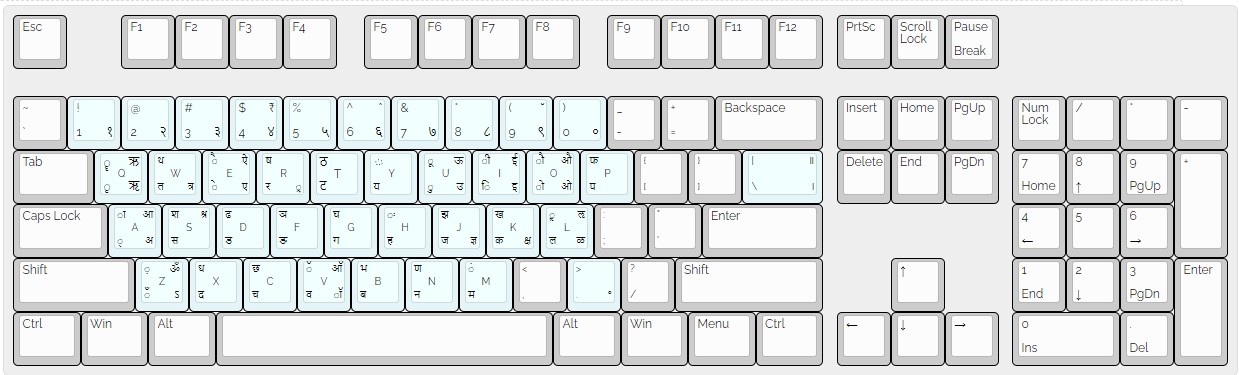
-
Instructions
There are upto 4 Devnagari letters/symbols on a key, which will be actived as follows
Top left (Shift + Key) | Top right (Ralt + Shift + Key)
Bottom left (just Key) | Bottom right (Ralt + Key)
Take the Key for example
ू (Shift + U) | ऊ (Ralt + Shift + U)
ु(U) | उ (Ralt + U)
“Ralt” is Right Alter Key - Examples
- भारत = भ + ा + र + त (shift.B + shift.A + R + W)
- समुंद्र = स + म + ु + ं + द + ् + र (S + M + U + shift.M + X + A + R)
- 500₹ = 5 + 0 + 0 + Ralt.shift.4
- ५००₹ = Ralt.5 + Ralt.0 + Ralt.0 + Ralt.shift.4
- प्रेम = प + ् + र + े + म (P + A + R + E + M) or (P + Ralt.R + E + M)
- पर्वत = प + र + ् + व + त (P + R + A + V + W)
- NOTE : Shift+Y is “zero-width non-joiner (ZWNJ)”, This allows to letter to remain seprate instead of combining, see below example
विद्यालय & विद्यालय ; Both are same i.e. व+ि+द+्+य+ा+ल+य but can be written as follows- विद्यालय = V + X + A + Y + shift.A + L + Y
- विद्यालय = V + X + A + shift.Y + Y + shift.A + L + Y
ZWNJ stops combining of two letters and allows us to keep them seprate
- विद्यालय = V + X + A + Y + shift.A + L + Y
-
More layouts on the way
- For anything, let us know at our Instagram @programming.in.hindi